
Anyone who creates content knows that writing the first draft is only the beginning. Trust us, we’ve been there.
The real work happens during editing, where editors revisit the same paragraph several times, experiment with different wording, simplify complex ideas, and adjust the tone until the content feels ready to publish.
These repetitive editing tasks are exactly where AI can make the biggest difference. Instead of spending time rewriting the same paragraph over and over, editors can use AI to refine, improve, and experiment with different versions in seconds.
But editing is rarely as simple as clicking a predefined action. Sometimes the best result comes from giving more specific instructions, building on a previous response, or improving only the part of the text that needs attention.
That's the idea behind the latest improvements to Prepr's AI text assistant. Editors can now refine content more naturally with custom prompts, continued prompting, and AI-powered editing directly within the content editor, making it easier to move from first draft to publication.
From predefined actions to flexible editing
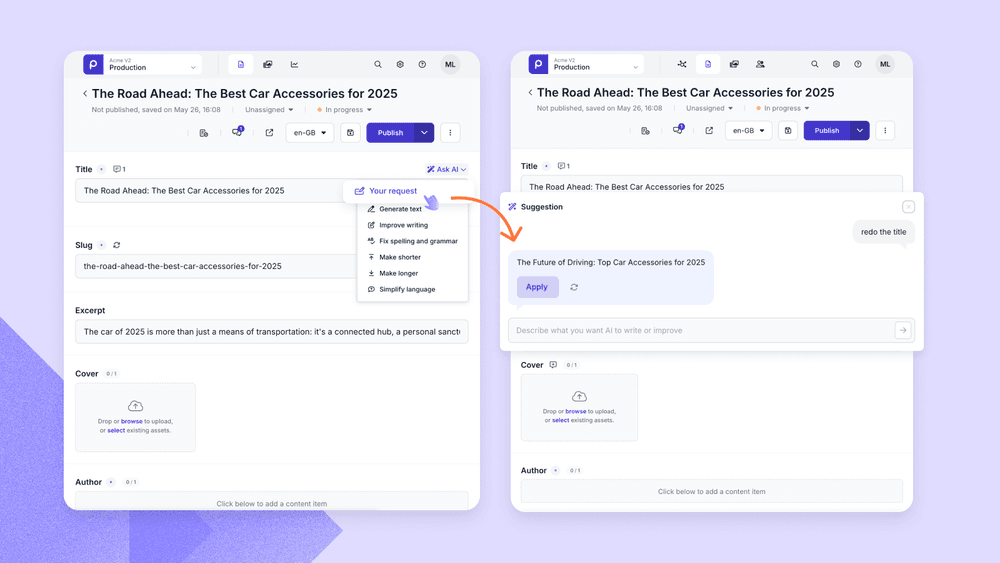
Before this update, Prepr’s AI text assistant helped editors with common editing tasks through a set of predefined actions such as improving writing, fixing spelling and grammar, or simplifying language. These shortcuts were useful for quick edits, but they couldn't cover every situation.
That's why we've expanded the AI text assistant with three new capabilities that give editors more flexibility throughout the editing process:
- Custom prompts: Give AI your own instructions instead of choosing from a predefined action.
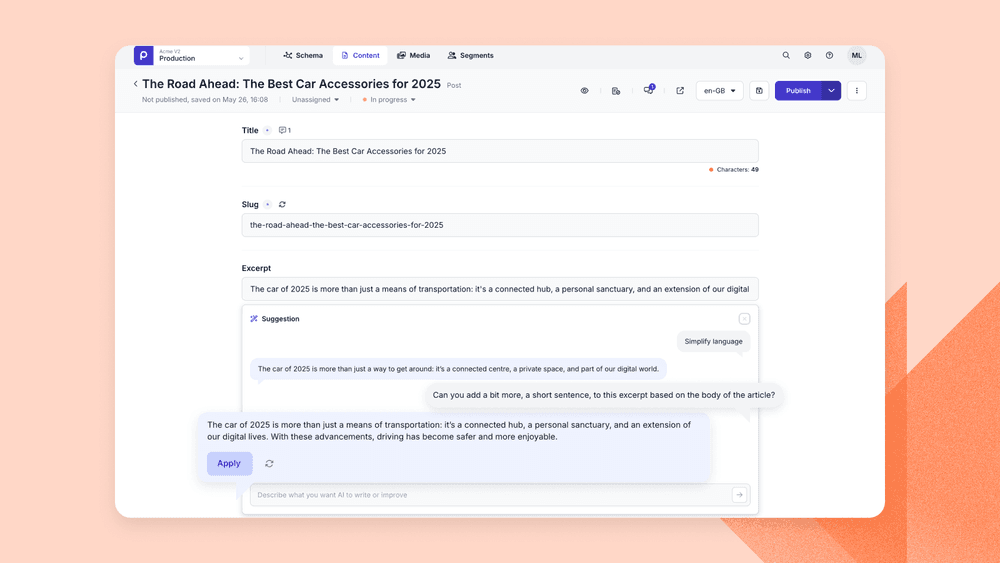
- Continued prompting: Refine previous AI responses through multiple iterations until the result feels right.
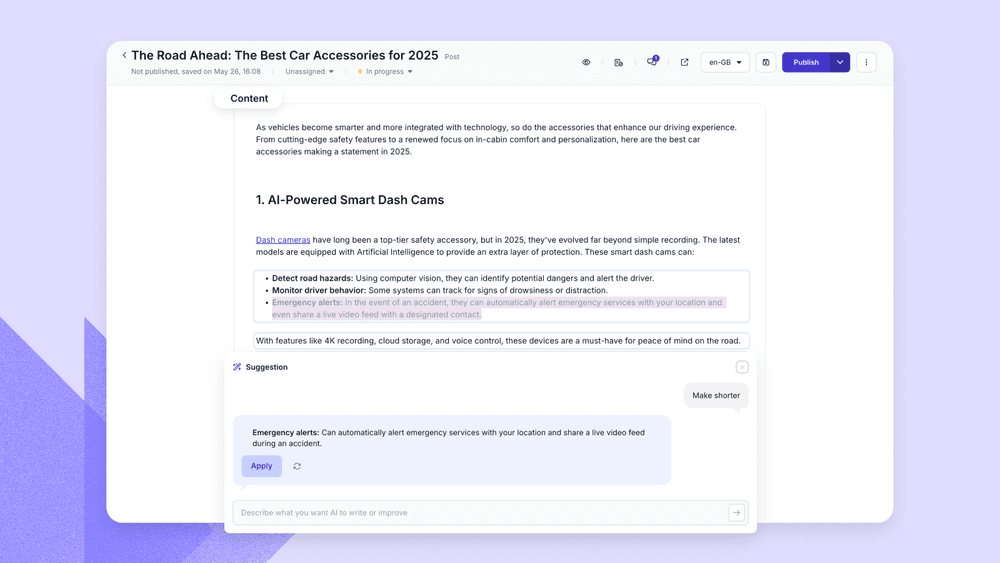
- AI optimization in the Dynamic Content editor: Improve selected text directly within rich text content, without interrupting your editing workflow.
Together, these improvements make AI feel less like a collection of individual tools and more like a collaborative editing assistant that adapts to the way you edit.


Tell AI exactly what you need with custom prompts
Every piece of content needs something different from an edit, and predefined actions can only stretch so far to meet that. A landing page might need a stronger call to action, while a technical article needs its explanations clarified without losing the details that make it accurate.
These requests are often too specific for predefined editing actions.
That's where Custom prompts come in. Instead of choosing from a fixed list of options, editors can describe exactly what they want in their own words. That might mean rewriting a paragraph for a different audience, adjusting the tone of voice up or down, or asking AI to preserve certain terminology while it reworks everything around it, whatever the edit actually calls for, rather than whatever happens to be on the list.

Refine your content with continued prompting
Writing rarely stops after the first revision, and the same is true once AI is involved.
One suggestion tends to lead to another as you fine-tune the wording, adjust the tone, or clarify a message that isn't landing quite right yet, and starting a fresh request each time means losing all the context you'd already built up.
Continued prompting keeps that conversation going instead. Once AI has generated a response, you can ask for another refinement, make it shorter, change the tone, or add more emphasis on one point over another. Each new prompt builds on the previous result, so you can gradually shape the content until it feels right.

Improve only the text that needs it with AI optimization in the Dynamic Content editor
Not every edit calls for reworking an entire article. More often, it's a single paragraph, a product description, or even one sentence that needs another look. Reworking the whole page just to improve one section can interrupt your flow and introduce changes you didn't actually want elsewhere.
With AI optimization now available in the Dynamic Content editor, you can select only the text that needs attention and apply AI directly within your rich text content. The rest of your article stays exactly as it is, making it easier to experiment with different wording, improve readability, or polish specific sections without affecting the overall structure.
Bringing AI optimization into the Dynamic Content editor means the improvement happens right where you're already writing, so you can stay focused on the content itself from the first draft through to the final review.

Part of a broader AI toolkit for content teams
The latest improvements to the AI text assistant are part of Prepr's broader investment in helping content teams work more effectively with AI.
Alongside Custom prompts, Continued prompting, and AI optimization in the Dynamic Content editor, Prepr offers a growing set of AI capabilities that support every stage of the content lifecycle. Content teams can generate and translate content, review SEO recommendations, and even work with AI agents through the MCP Server to create, update, review, and manage content directly in Prepr.
To discover everything Prepr's AI platform has to offer, explore our AI Resources, where you'll find documentation, best practices, and guides covering the AI text assistant, AI-ready documentation, the MCP Server, adaptive content suggestions, and more.