
For all the progress around AI in content workflows, one part of the process has barely changed.
Teams are writing differently. They use AI to draft articles, explore ideas, rewrite sections, or adapt content for different audiences. In many cases, that shift has already settled into everyday work.
What happens next is more familiar.
Once a piece is ready, it still needs to be added to the CMS. That usually means going back and forth between tools, copying content over, setting up the structure, assigning it, and pushing it through the usual workflow. It’s not complicated work, but it is repetitive, and it sits right in the middle of a process that is otherwise becoming more automated.
The Prepr MCP Server is designed to address that part of the workflow.
It allows AI agents to work directly with content in Prepr, instead of stopping at content creation. Content written in tools like Google Docs or Notion can be turned into structured items in the CMS, assigned to a teammate, and moved forward without going through the usual manual steps.
From demo to reality: letting the agent take over
As part of the release, we tested how this would work in practice. In our internal demo, we started with a very ordinary situation. A blog article written in Notion, reviewed, and ready to be published. The kind of content that, in most teams, would now be copied into the CMS and set up there.
Instead, we stayed in Notion and asked the agent to take care of that step.
From the same document, it created a content item in Prepr, structured the content, set the correct locale, assigned it to a teammate, and moved it into review. When something was unclear, it came back with a question before continuing.
What stood out in that demo was not speed or automation, but how little translation was needed between intent and action. The request itself was enough to trigger the right steps in the CMS.
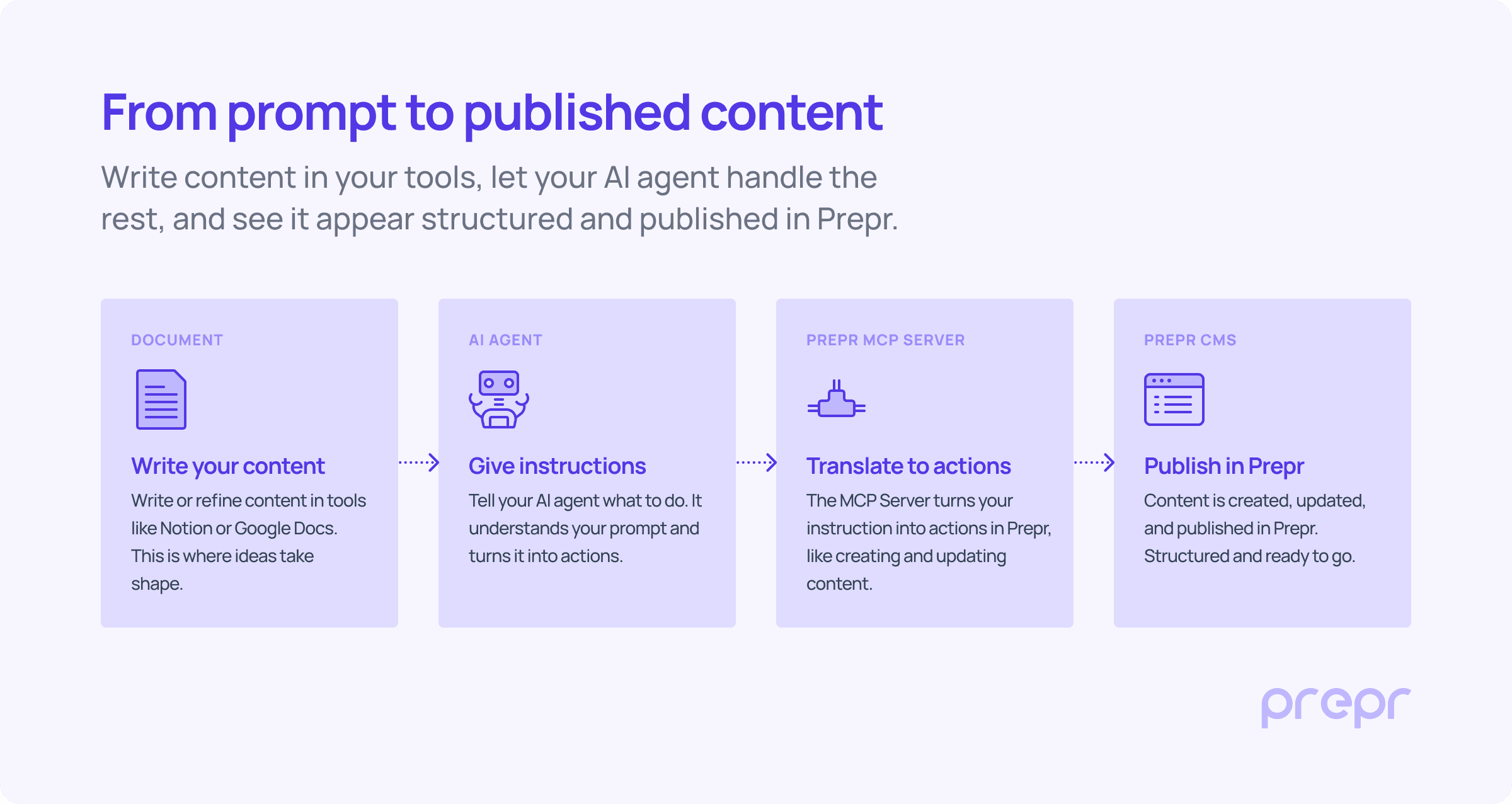
An example of how content moves from a document to Prepr through an AI agent and the MCP server.
The Prepr MCP Server links the agent directly to Prepr and exposes a set of clearly defined operations, such as creating content items, updating them, assigning them, or moving them through workflow stages. These are the same actions someone would take in the interface, but now they can be triggered through an agent.
This also depends on how the connection is designed.
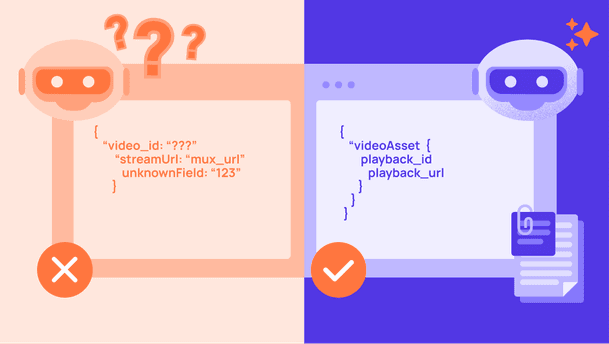
Some MCP servers simply expose the underlying API and leave it to the agent to figure out what to do. That gives a lot of flexibility, but also a lot of room for errors or inconsistent results. In Prepr, the agent works with a defined set of actions instead. Things like creating a content item, assigning it, or moving it to review are already structured as tasks. That makes it easier for the agent to choose the right step and follow the intended workflow.
What the AI agent can actually do in Prepr
Once the agent is connected to Prepr, the interaction becomes very direct.
You can ask the agent to work with the content inside your CMS in the same way you would. That includes straightforward tasks, like finding an existing article or checking what has already been published on a certain topic.
But more importantly, it includes the actions that usually take place after the content is ready.
Instead of navigating the interface and performing each step manually, the same actions can be requested in natural language, as part of the workflow you are already in.
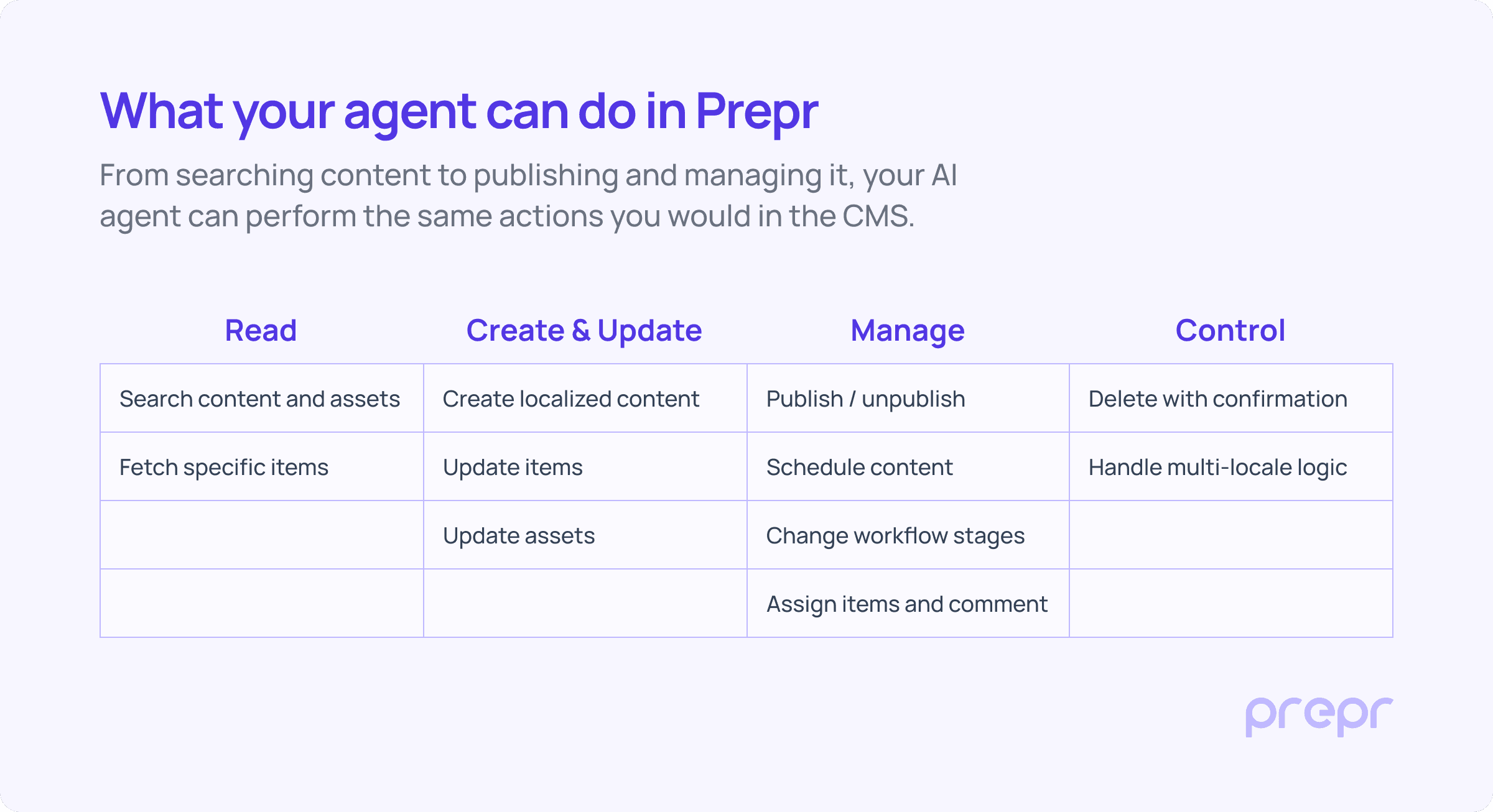
An overview of the types of actions an AI agent can carry out in Prepr, including reading, creating, managing, and controlling content.
There are also some clear boundaries to how this works today.
The agent operates within the permissions defined by the access token, so it can only perform actions it has been allowed to perform. If information is missing, it is expected to ask for clarification before continuing. And for more sensitive actions, such as deleting content, confirmation is required.
At this stage, the focus is on content operations. The agent can read existing content and schema, and work with content items directly. Broader capabilities, such as more advanced schema editing, are not the main focus yet and will evolve over time.
How teams are starting to use AI agents
The most immediate applications are not complex.
You see it most clearly in three areas: editorial workflows, technical tasks like migrations, and the way teams work with existing content. Each of them looks slightly different, but they all reduce the same kind of manual work around content.
Editors: from document to CMS without the manual steps
For editors, the change is easy to understand.
Instead of moving content from a document into the CMS, they can stay in the tool they are already using and ask the agent to take over that step. A blog post written in Notion or Google Docs can be turned into a structured content item in Prepr, assigned to the right person, and moved into review without recreating it manually.
Developers: simplifying migrations and setup work
For developers, the value shows up in a different way.
Content migrations, for example, often involve writing scripts, mapping fields, and running imports to move content from one system to another. With an agent connected through MCP, part of that work can be handled more flexibly. A dataset or export file can be used as input, and the agent can create or update content items in Prepr based on that structure.
Content and marketing teams: working with what’s already there
There are also early use cases around exploring and reusing existing content.
Because the agent can search and read content in Prepr, it can be used to look up what already exists before creating something new. That can be as simple as checking which articles have already been written on a topic, or identifying gaps where new content might be needed.
A new way to interact with your CMS
Looking at these examples, what stands out is not a new feature, but a different way of interacting with the CMS.
The interface is still there for editors. The API remains the foundation for developers. But alongside those, a new layer is emerging, where agents can carry out structured actions based on natural language instructions.
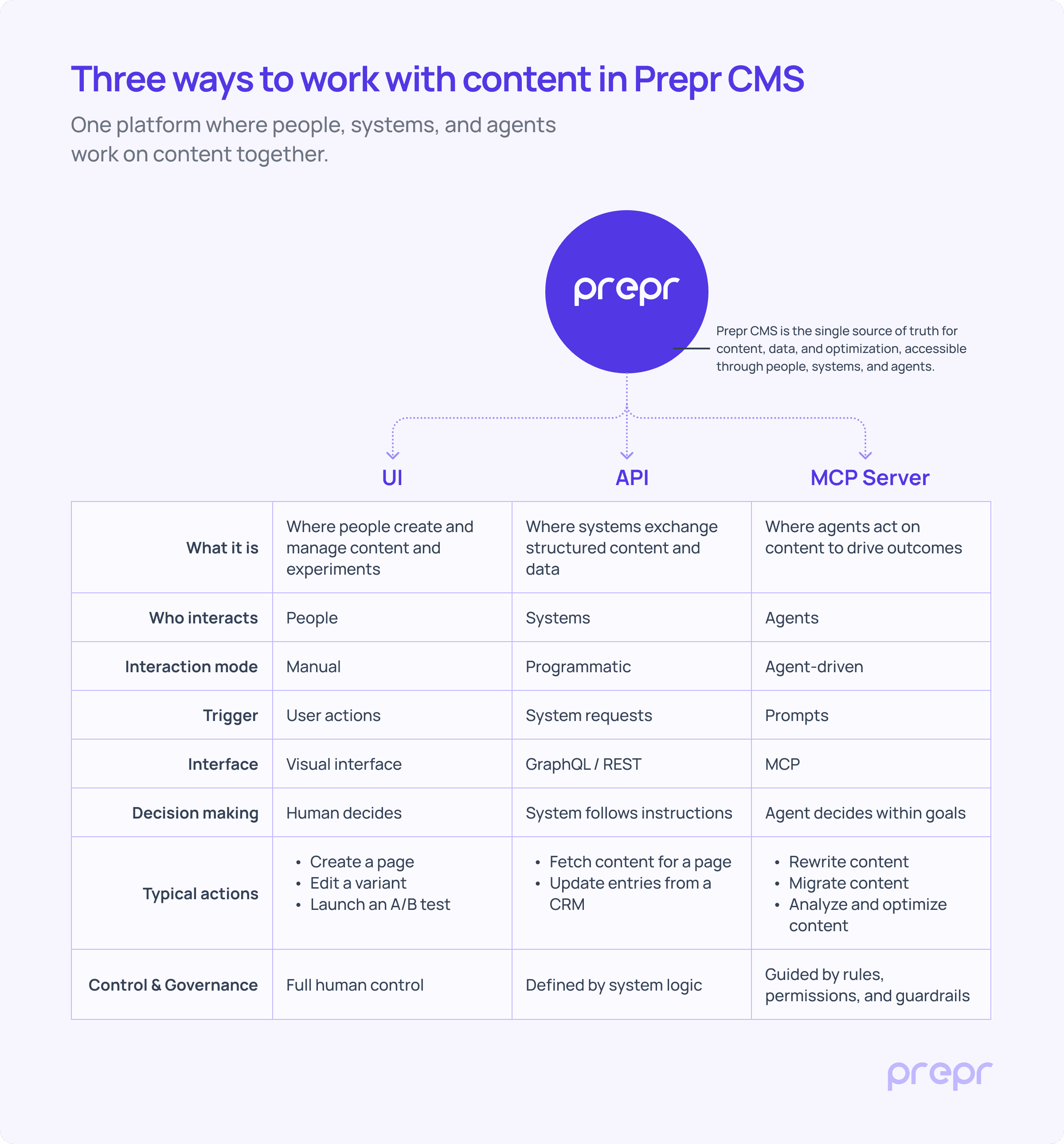
Content in Prepr can be managed in three ways: by people through the interface, by systems through the API, and by agents through the MCP server.
Start experimenting with your own agent
The Prepr MCP Server is currently available in beta.
It is designed for teams who want to explore how AI agents can become part of their content workflows, starting with the operational side of managing content.
Setting it up requires connecting your own agent and defining the right permissions, but once in place, it opens up a different way of working with the CMS.
If you want to try it yourself, you can request access and start experimenting with your own setup.