As developers, we spend a lot of time asking questions.
Some of them are about architecture or performance. Many are smaller and more practical: how an API is structured, which fields to query, or how a feature is supposed to work in a real project. Often, the first place we ask a question isn’t the documentation anymore. It’s ChatGPT, Claude, or the AI assistant inside our editor.
For broad topics, this works fine. But as soon as the question becomes product-specific, the answers get less reliable. Field names are slightly off, examples don’t fully line up with the product, and important implementation details are easy to miss. In practice, that means you still end up opening the documentation to verify what actually works.
That gap between AI help and real implementation is what pushed us to rethink how our documentation works. Not how it looks on a website, but how it’s consumed by the tools developers already rely on.
The problem with generic AI answers
AI models don’t validate APIs or check schemas. When they don’t have direct access to product-specific documentation, they rely on patterns they’ve seen elsewhere. The result often looks reasonable, but it’s based on assumptions rather than the actual API contract.
We’ve seen this happen with our own APIs. A query looks correct at first glance, but uses fields that don’t exist in Prepr. An example explains the right idea, but leaves out required arguments or system fields. Small differences like these are easy to miss, and they usually show up later as runtime errors or broken integrations.
The issue isn’t that AI tools are unreliable by nature. They’re working with incomplete context. Without a clear, authoritative source to pull from, they default to what’s common or statistically likely. For developers, that means extra verification work and less confidence in the answers we get.
Documentation is now an AI input, not just a website
Documentation still defines how a product works, but today it’s often accessed through AI tools before it’s read directly.
Traditional documentation sites are optimized for human reading. They’re split across pages, rely on navigation, and assume a reader will move back and forth to build context. AI tools don’t work that way.
If we expect AI tools to give accurate, product-specific answers, they need something closer to a source of truth than a collection of linked pages. They need documentation that can be consumed as data: complete, consistent, and available as a single context.
Once you look at documentation through that lens, the question changes. It’s no longer “how do we present this on the site?” but “how do we make this usable for the tools developers are actually using?”
Making Prepr’s documentation AI-ready
As AI tools become part of everyday development workflows, documentation needs to be available in a format those tools can work with directly.
Files like llms.txt and llms-full.txt are becoming a practical way to give language models direct access to product documentation with the right context. llms.txt acts as an index, giving an AI tool a structured overview of the documentation and pointing it to the relevant sections. llms-full.txt provides the full context in one place, compiling the entire documentation into a single, readable file.
At Prepr, the documentation itself didn’t need to change. It was already complete and structured for developers reading it on the web. What needed to change was how that same content is exposed, so AI tools don’t have to rely on partial context or make assumptions.
The website at docs.prepr.io remains the primary place for developers to read and explore the docs. The LLM-friendly files simply make the same source of truth accessible to the tools developers are increasingly using alongside it.
What we actually built
We published two documentation files designed specifically for AI consumption. Both are generated from the same source as our public docs, but serve different use cases.
The first is llms.txt It’s a lightweight index of the documentation: a structured overview of what Prepr offers, with links to the relevant sections. It’s useful when you want to point an AI tool in the right direction without loading the entire documentation. The file is available at docs.prepr.io/llms.txt.
The second is llms-full.txt. This file contains the entire documentation in one place. Guides, API references, schema definitions, and code examples are compiled into a single Markdown file. Having everything in a single context helps AI tools stick to Prepr’s actual structure instead of filling in gaps from assumptions. You can find the full file at docs.prepr.io/llms-full.txt.
In practice, llms.txt works well for quick orientation. llms-full.txt is the better choice when you want the AI to answer questions based on the full Prepr documentation.
Try it yourself with a real example
A good way to see the difference is to ask a very specific question.
For example: what fields do I need to query to get a Mux video playback URL from Prepr?
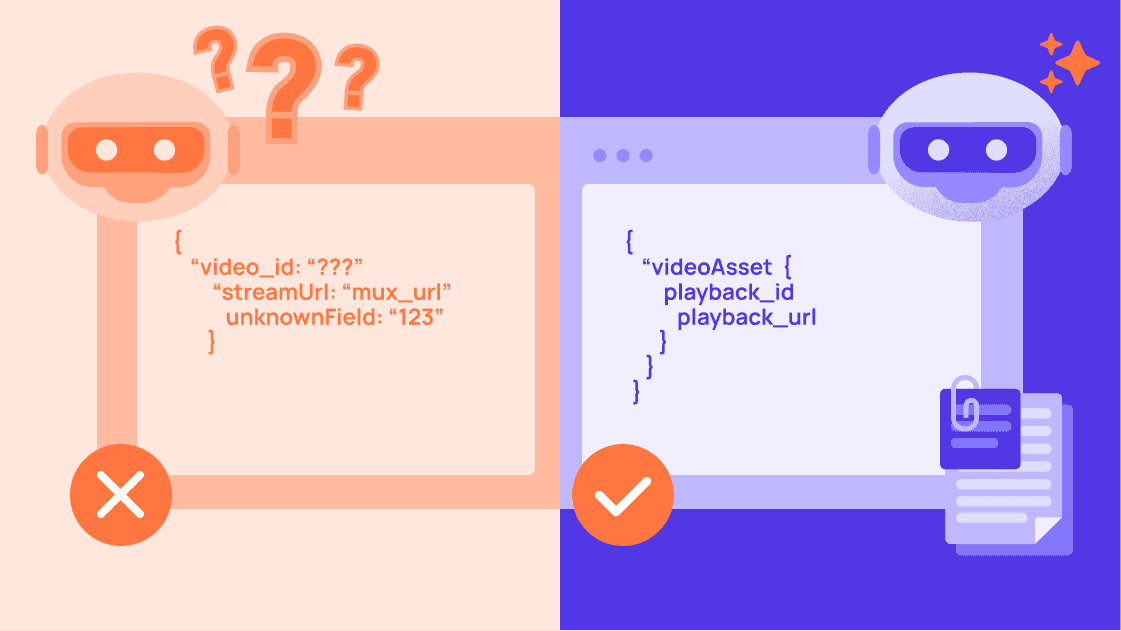
Without access to Prepr’s documentation, an AI will usually answer by explaining how Mux works in general. You’ll get references to playback IDs, HLS streams, and standard URL patterns. All of that is technically correct, but it doesn’t tell you how Prepr exposes those values through its GraphQL API.
With llms-full.txt available as context, the answer changes. Instead of guessing, the AI can point to the actual fields used in Prepr’s asset model. It can show where the playback_id lives, how it relates to the video asset, and how to construct the playback URL as part of a real query. Duration, resolution, and other metadata come from the same structure.
The answer doesn’t just describe the concept. It follows the structure of Prepr’s API as it exists today, which makes it possible to move from question to implementation without filling in the gaps yourself.
How to use it with AI tools
How you use these files depends on where you already work. The idea is always the same: give the AI direct access to Prepr’s documentation so it can answer questions with the right context.
ChatGPT
You can reference either file directly in a conversation, or add llms-full.txt as knowledge when creating a custom GPT. For shorter sessions or quick questions, llms.txt is often enough. For more complex queries, the full file works better.
Claude
Claude supports working with persistent context through Projects, but you can also paste the file or its URL into a conversation. When the full documentation is available, follow-up questions tend to stay much closer to Prepr’s actual API and data model.
Cursor, Windsurf, and VS Code with AI
If you’re using an AI-enabled editor, you can add https://docs.prepr.io/llms-full.txt as a documentation source. This allows the assistant to reference Prepr’s docs while you write code, instead of relying on generic patterns. If you prefer a lighter setup, llms.txt is usually sufficient.
Claude Code
For Claude Code, you can drop either file into your repository and reference it from your CLAUDE.md. This keeps Prepr’s documentation available during development without leaving the codebase.
If you want the step-by-step setup for each tool, we included it in our documentation.
What’s included in AI-ready files
The documentation files cover the same material you’ll find on docs.prepr.io, just packaged in a way that’s easier for AI tools to process as a whole.
Schema & Modeling
That includes how content is modeled in Prepr, from schemas and components to field types, enumerations, and common patterns for things like blogs, landing pages, and e-commerce setups. The structure matters here, because it defines how content is queried and used in real projects.
GraphQL API
The files also include the full GraphQL API reference. Queries, filtering, sorting, pagination, localization, and caching are all documented, along with system fields such as IDs, slugs, and publish states. This is often where generic AI answers fall short, so having the exact API surface available makes a noticeable difference.
Personalization & A/B testing
Personalization and A/B testing are covered as well. Segments, variants, tracking, and conversion events are documented with the same level of detail as the rest of the platform, which helps when you’re configuring adaptive behavior instead of just reading about it.
Framework guides and advanced features
On top of that, the files include framework-specific guides with working examples. Next.js, Nuxt, React, Vue, Angular, and backend setups in Node.js, PHP, and Laravel are all part of the documentation, alongside more advanced features like webhooks, video delivery with Mux, preview environments, and CI/CD integrations.
None of this is new content. The difference is that it’s all available in one place, as a single, consistent source of truth.