


Content modeling plays a central role in how digital experiences are built.
For developers, it’s not just about defining fields, but about creating structures that are maintainable, scalable, and easy for editors to work with over time.
That’s why we’ve released a set of updates focused on improving how developers work with content models in Prepr, giving them more control, better visibility, and more efficient workflows.
These updates make schema management more efficient for developers while also improving the editing experience for content teams.
Why we focused on improving content modeling in Prepr
In practice, content modeling doesn’t stop after the initial setup.
As implementations evolve, developers revisit and refine content models to support new requirements, improve the editorial experience, and manage changes across environments.
This ongoing work makes the workflow around content modeling just as important as the model itself.
Small inefficiencies can have a noticeable impact on development speed and long-term maintainability.
That’s why we’ve focused this release on improving the parts of content modeling developers rely on most, including:
- Better visibility into schema sync status with connected repositories
- A new schema specification for validation and generation workflows
- More flexible control over field layouts in content forms
- Faster navigation through large schema setups
- More control over which fields appear in content item filter menus
Together, these updates help developers work more efficiently with the schema from initial setup through ongoing maintenance.
Better visibility into schema sync status
When managing your content structure through version control, it needs to be clear whether your schema is in sync and what version is currently applied.
To make that easier, we’ve improved the visibility of schema sync information in the Prepr schema interface.
The sync action has been moved to the top of the page, making it easier to find and access when needed. Previously, the sync controls could be harder to spot, especially in larger schema setups.
Alongside that change, the sync UI now shows more contextual information, including the connected repository, branch, latest synced commit, and a clear status indicator showing whether the schema is currently in sync.

A green indicator means your schema is synced. A yellow indicator highlights when changes are out of sync and may require attention.
Together, these updates make the schema sync status easier to understand and give developers more confidence when managing schema changes across environments.
Introducing the Prepr Schema Spec
Alongside these workflow improvements, we’re also introducing the Prepr Schema Spec, a specification file designed to help developers generate and validate schema JSON files for Prepr.
The schema spec provides a standardized JSON structure that defines how Prepr schema elements should be formatted, including models, components, enumerations, and remote sources.
Developers can use the spec as structured input for AI agents or development tools to generate schema JSON automatically based on project requirements or UX designs. This type of AI-assisted schema generation is still evolving, and results should always be reviewed before use.
The spec can also be used to validate manually created schema files before importing them, helping reduce errors in schema-as-code workflows.
Using the schema spec in this way opens the door to more advanced schema generation and validation workflows for teams looking to automate parts of their implementation process.
More flexible control over content form layouts
The way content fields are arranged in the editor has a direct impact on how efficiently editors can work.
When related fields are grouped logically, and forms are easy to scan, editors can move through content items faster and with more confidence. But achieving that often requires more flexibility than fixed layout structures allow.
To give developers greater control over the editorial experience, we’ve replaced the previous fixed column structure for model and component fields with a new percentage-based field width option.
Instead of relying on predefined columns, developers can now assign custom widths to individual fields based on how much space they actually need. For example, a short text field might only require 25% of the row, while a larger field, like a bio or summary, can take up 75% or 80%.
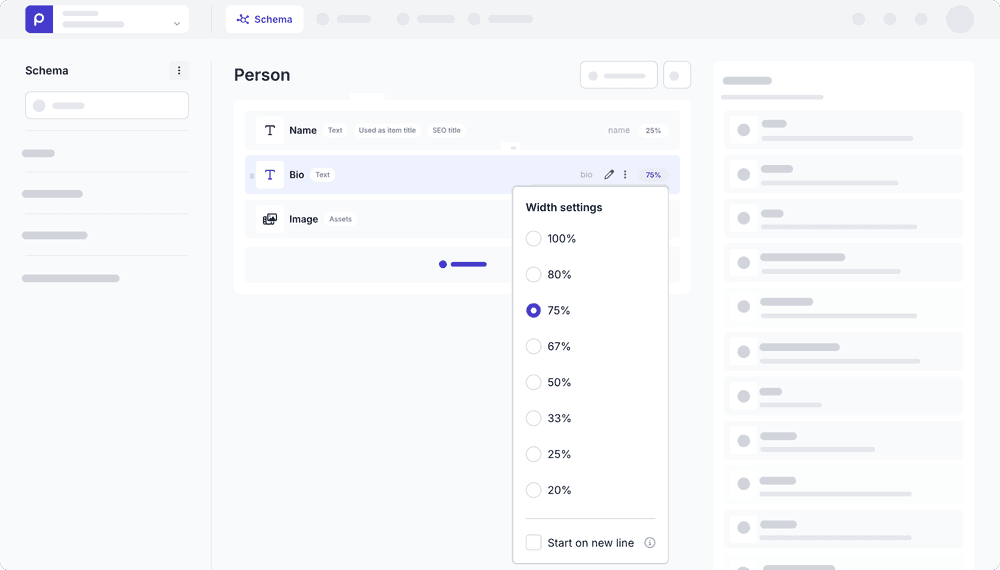
This level of flexibility makes it easier to design content forms that reflect the structure of the content itself, rather than forcing everything into rigid column layouts.
For editors, the result is a cleaner and more intuitive editing experience, with forms that are easier to scan and better organized around the content they manage.
When working with larger schemas, developers often need to move quickly between models, components, enumerations, and remote sources while building or refining content structures. Without a fast way to navigate, that process can become unnecessarily time-consuming.
To make Prepr schema navigation faster, we’ve introduced a new search bar in the schema interface.
Developers can now search across models, components, enumerations, remote sources and even folder names from one place and jump directly to the schema element they need.
This reduces time spent navigating through complex schema setups and helps developers stay focused while working.

More control over content item filters
As content models become more complex, filter menus can fill up with fields that offer little value in day-to-day editorial workflows, making it harder for editors to quickly find the filters they actually need.
To help developers create a cleaner filtering experience, we’ve introduced a new Show in filters setting for List, Stack, and Content Reference fields.
When disabled, the selected field will no longer appear in content item filter menus or item selectors.
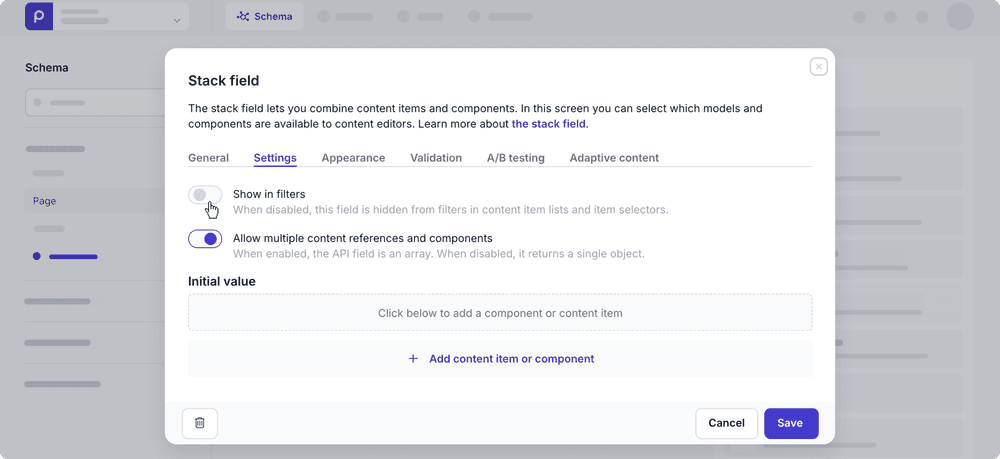
This gives developers complete control over which filters are exposed to editors. The result is a more focused filtering experience that helps editors navigate content more efficiently and with less visual clutter.
Continuing to improve the developer experience
Working with content models is a core part of building in Prepr, and improving that experience remains an important focus for our product team.
These latest updates are designed to make content modeling more flexible and more transparent, as implementations grow in complexity.
Together, they improve the workflows developers rely on every day, whether that means structuring content forms, syncing your schema, reducing UI clutter for editors, or exploring new schema generation workflows.
And because better tooling leads to better editorial setups, these improvements also help create a smoother experience for content teams working in Prepr every day.
We’ll continue refining the content modeling experience in Prepr as the needs of modern development teams evolve.