
Personalization becomes more powerful when you combine a CMS with a CDP, but it also raises a practical question about how the two should work together.
When you use CDP data for personalization in Prepr, you’re combining two systems that each play a different role. Prepr manages content and delivers the experience. A CDP manages customer data, profiles, and segmentation. Together, they make more advanced personalization possible.
The question is how to divide responsibilities between them.
In some setups, the CDP controls segmentation and passes the result to Prepr. In others, Prepr takes a more active role, using real-time behavior, while the CDP adds deeper customer context.
Both approaches work. The key is how to combine them in a way that fits your setup.
Prepr personalizes in real time, and the CDP adds customer context
Prepr and a CDP play different roles in how personalization works.
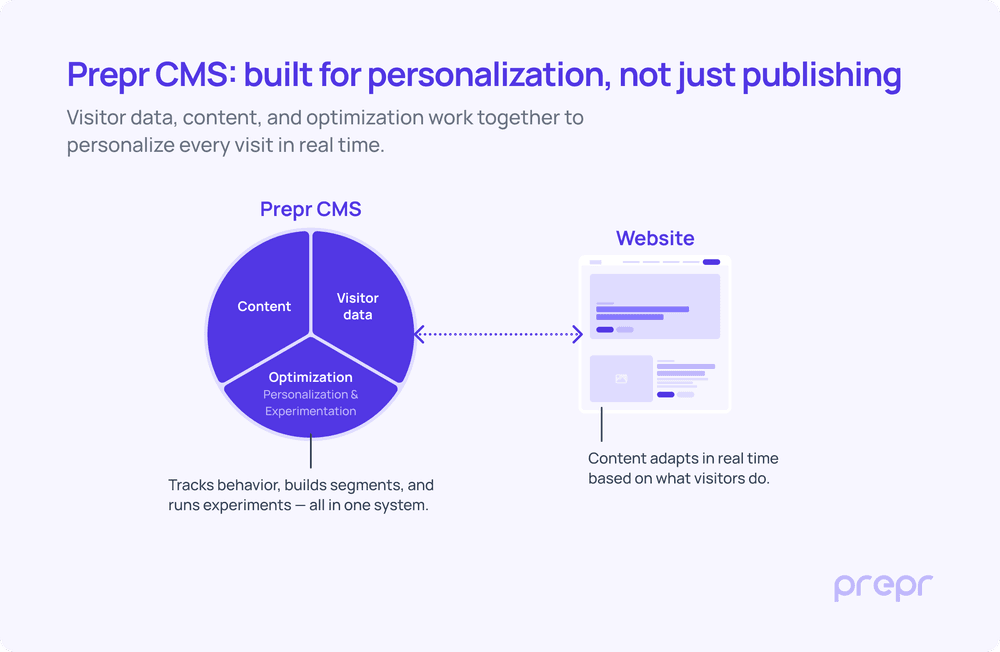
On its own, Prepr handles real-time behavior and the experience. It tracks what visitors do on the website, views, clicks, sessions, and uses that to adapt content immediately. Segments are built in real time, and pages, components, and experiments adapt as behavior happens.
This is the basic setup in a simple martech landscape, without separate tools for data and optimization.
As projects and organizations grow, more systems become part of the overall setup, such as a CRM or a CDP.
A CDP adds a different layer. It manages customer data over time, across systems and channels. This includes things like accounts, orders, subscriptions, or lifecycle stages, information that builds up beyond a single session.
It connects interactions over time and provides context that goes beyond what happens in the moment. This isn’t data the CMS should own. Instead, it complements what Prepr already does, adding customer context to the experience.
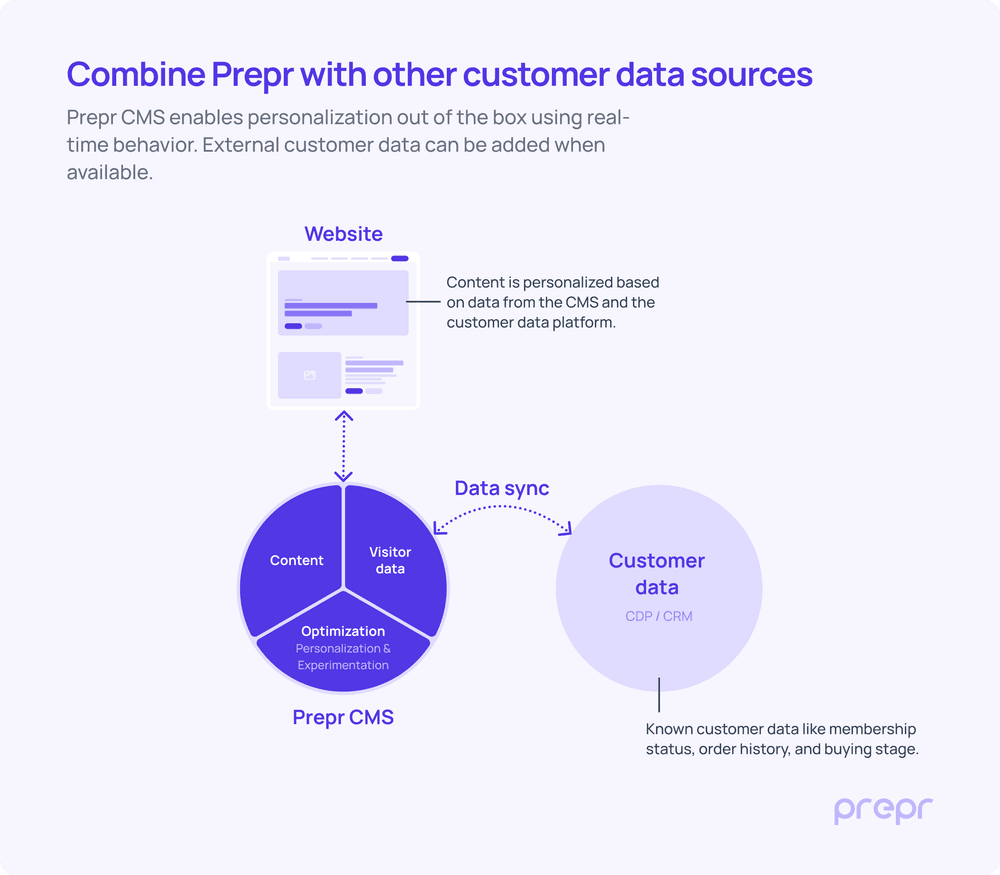
Two ways to combine Prepr CMS and your CDP
Once you introduce a CDP or CRM into your setup, personalization can be handled in two ways, depending on where decisions are made.
- You can let the CDP control customer data and segmentation, and Prepr uses that input to deliver the experience.
- You can split responsibilities, with Prepr handling real-time behavior and decisions, and the CDP adding customer context where needed.
Both approaches are valid. The difference is where decisions are made, and how that impacts speed, flexibility, and complexity.
Let’s look at these two approaches in more detail.
CDP-led setup: the CDP controls decisions
In this setup, the CDP/CRM controls customer data and segmentation, while Prepr is responsible for delivering the experience based on the segments it receives.
Personalization decisions are made outside the CMS.
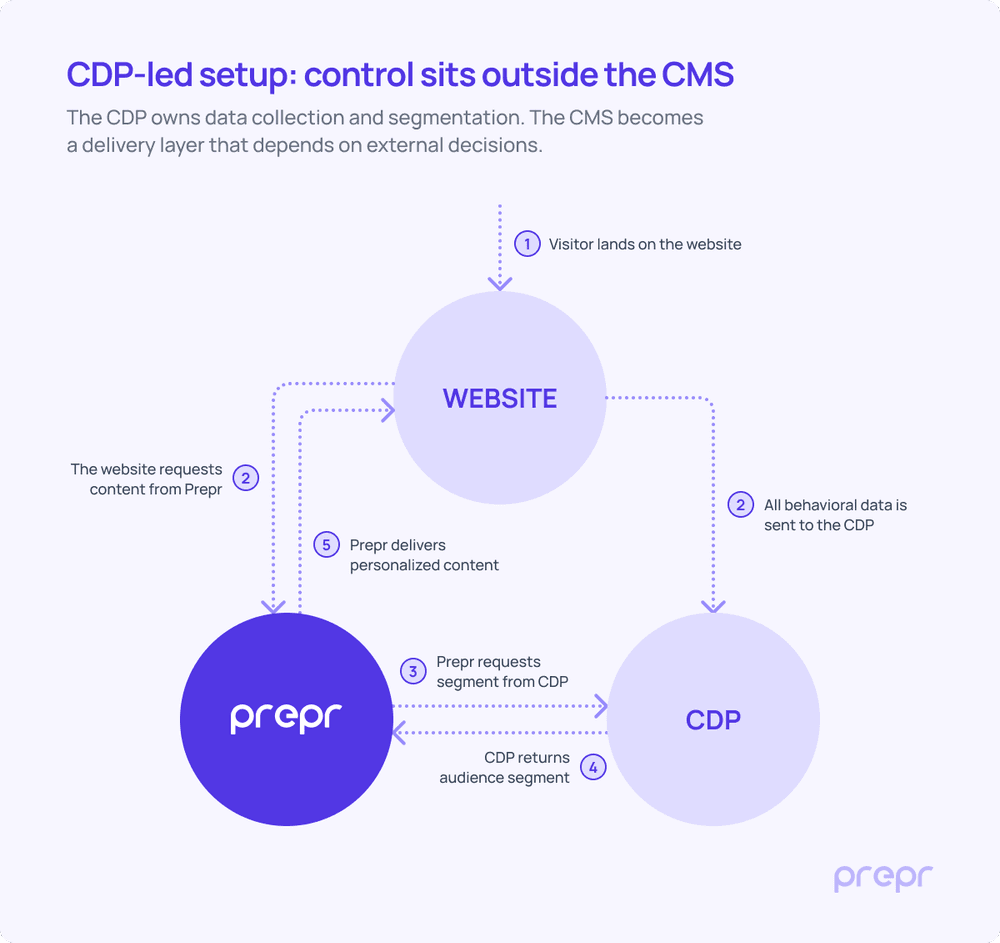
How it works
- A visitor lands on the website.
- The website sends behavioral data to the CDP and requests content from Prepr.
- Prepr requests the visitor’s segment from the CDP using an ID or token.
- The CDP returns the audience segment.
- Prepr delivers content based on that segment.
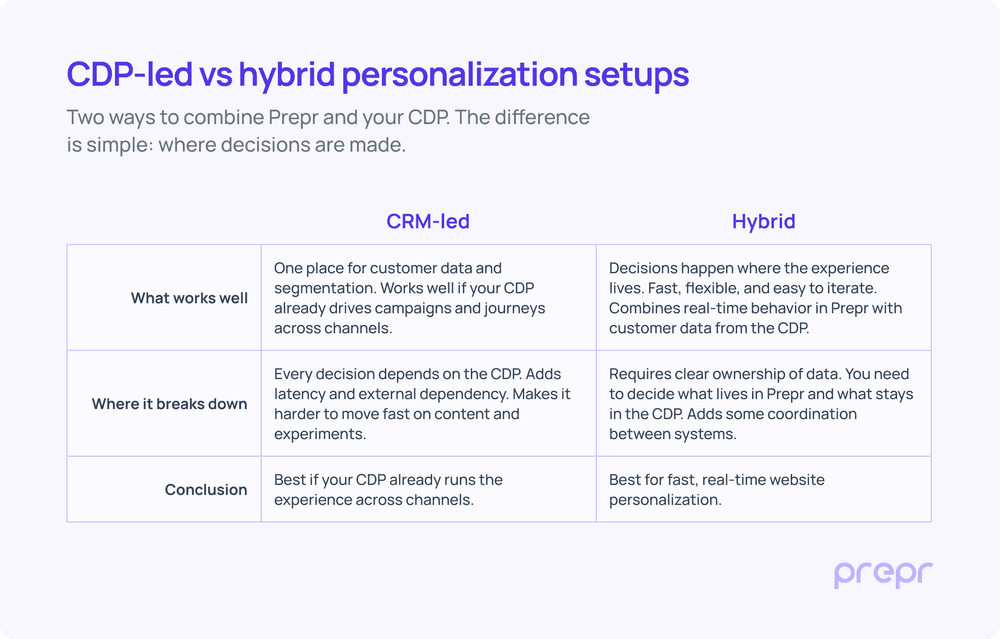
This approach gives you a single place to manage customer data and segmentation, which works well if your CDP is already central in your architecture. It also aligns easily with cross-channel personalization strategies.
At the same time, every decision depends on the CDP. This adds latency to each request and creates an external dependency for real-time personalization. It can also slow down iteration, as changes to targeting often sit outside the CMS.
In this model, your CMS acts as a delivery layer rather than a decision layer.
Hybrid setup: Prepr decides, and the CDP enriches
In this setup, Prepr and the CDP share control. Prepr handles behavior and content, while the CDP provides additional customer and transactional data when needed.
Personalization decisions are made in the CMS, enriched by the CDP.
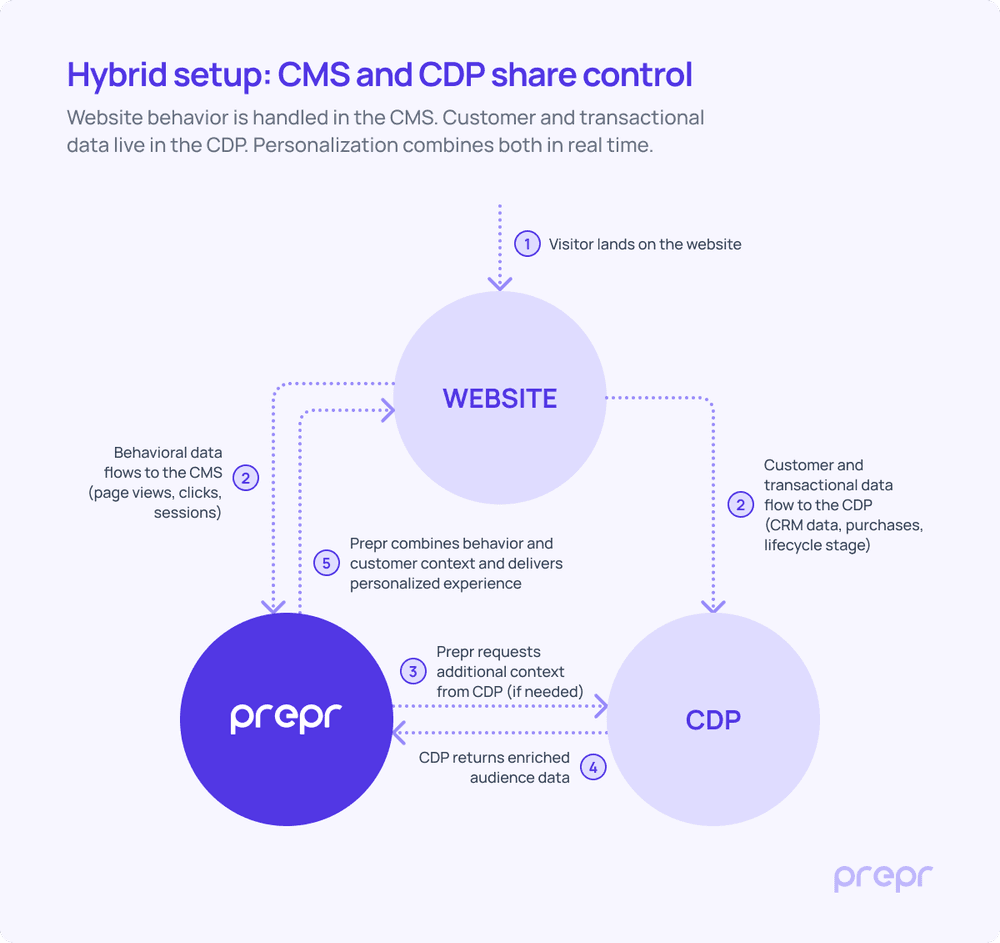
How it works
- A visitor lands on the website.
- Behavioral data flows directly into Prepr, while customer and transactional data is sent to the CDP.
- Prepr evaluates the visitor using its own data and requests additional context from the CDP if needed.
- The CDP returns enriched audience data.
- Prepr combines behavior and customer context to deliver a personalized experience.
This approach keeps real-time decision-making close to the content, which improves speed and makes iteration easier. Teams can adjust targeting and content in one place, without relying on external systems for every request.
At the same time, it introduces a shared responsibility model. You need clear boundaries between what lives in Prepr and what stays in the CDP. When done well, this setup balances flexibility and performance without adding unnecessary complexity.
In this model, your CMS acts as the decision layer, with the CDP as a supporting data layer.
What this means in practice
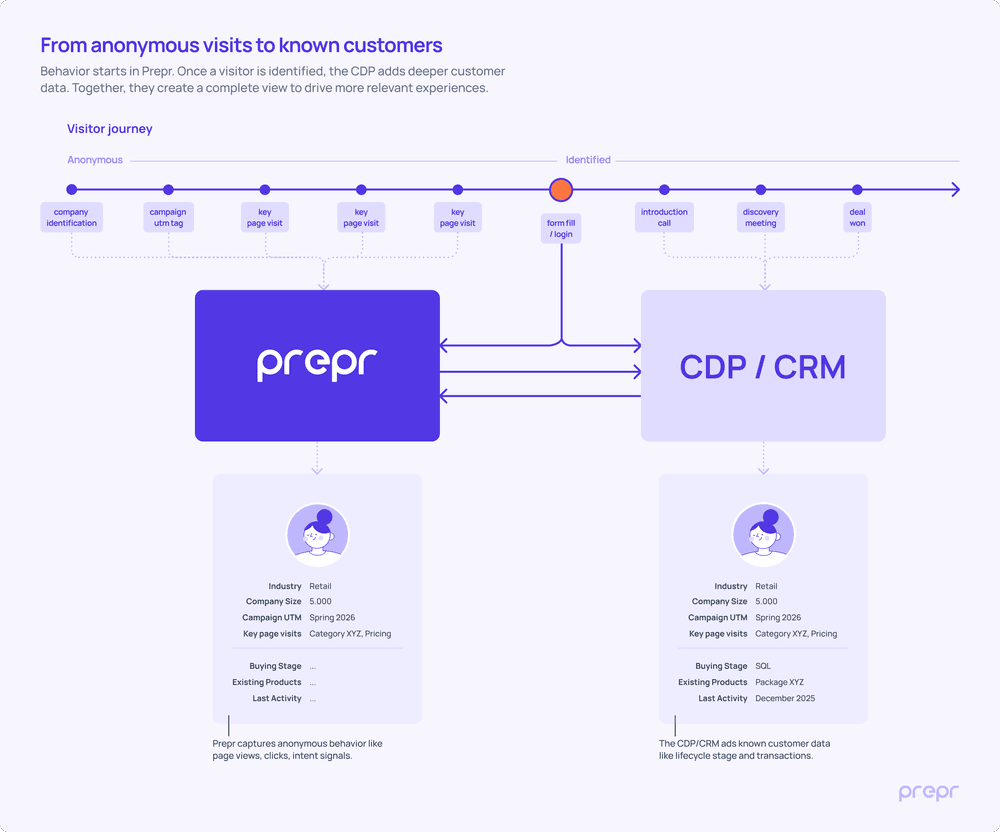
Personalization often starts before a visitor is known.
From the first visit, Prepr captures behavior through clicks, page views, and navigation patterns. This is where initial intent is built.
As soon as a visitor identifies, the CDP adds deeper customer context, such as role, lifecycle stage, or purchase history.
From that moment, personalization shifts from behavior to a more complete customer view, combining what someone does with who they are.
The strongest setups keep decisions close to the experience
Both approaches can work. It depends on how you use them.
If your CDP already drives journeys across channels, a CDP-led setup can make sense. It gives you one place to manage customer data and coordinate experiences beyond the website.
If your focus is real-time website personalization, keep decision-making close to the content. Use Prepr to capture behavior and adapt the experience in the moment.
Trying to centralize everything in one system often creates more friction than it solves. The strongest setups keep responsibilities clear, with the CMS handling the experience and the CDP adding customer context where it matters.
In most cases, this leads to a combined approach. Start with Prepr for real-time decisions, and add CDP data where it adds value.
If you want to explore how this works in your setup, feel free to get in touch.